

Views: 0 Author: Site Editor Publish Time: 2026-04-14 Origin: Site


Many users maintain the chair but forget the parts that shape daily comfort and control. Yet electric wheelchair accessories often affect posture, support, and convenience most. In this guide, you will learn which accessories need the most care, how to clean them safely, and when to adjust, repair, or replace them.
Not all electric wheelchair accessories wear at the same pace. The parts that deserve the closest attention are usually the ones exposed to body contact, repeated adjustment, vibration, or outdoor use. In practice, support accessories, mounted control accessories, and safety add-ons tend to show early signs of wear long before the wheelchair itself develops an obvious problem.
Accessory group | Primary maintenance concern | What users often miss |
Support accessories | Loss of comfort and alignment | Small shape changes can affect posture before damage is visible |
Control and convenience accessories | Gradual loosening or shifting | A stable-looking mount may still feel awkward or unsafe in use |
Safety-related add-ons | Reduced reliability outdoors | Dirt, moisture, and weak connections often build up quietly |
High-contact accessories such as the headrest and a suit of leg rest (2 pcs) should be treated as core support components, not optional extras. These parts directly influence how the body rests in the chair, especially during longer periods of use. A headrest that has lost firmness or shifted slightly out of position can reduce neck support and change head posture. In the same way, leg rests that no longer sit evenly can affect lower-body alignment and create discomfort during transfers, movement, or extended sitting.
Because these accessories work through contact and positioning, wear does not always appear as a tear, crack, or break. Padding may compress gradually, covers may loosen, and support angles may change over time. Users often notice the result as soreness, pressure, or fatigue before they notice visible damage. That is why these accessories should be checked for comfort, alignment, and support consistency rather than appearance alone.
The upper controller holder and similar mounted accessories deserve regular inspection because they are affected by more than simple wear. Daily transfers, folding, vibration from uneven surfaces, and repeated repositioning can all reduce stability over time. Even when the holder still looks intact, a small shift in angle or mounting tension can make the controller harder to reach or less comfortable to use.
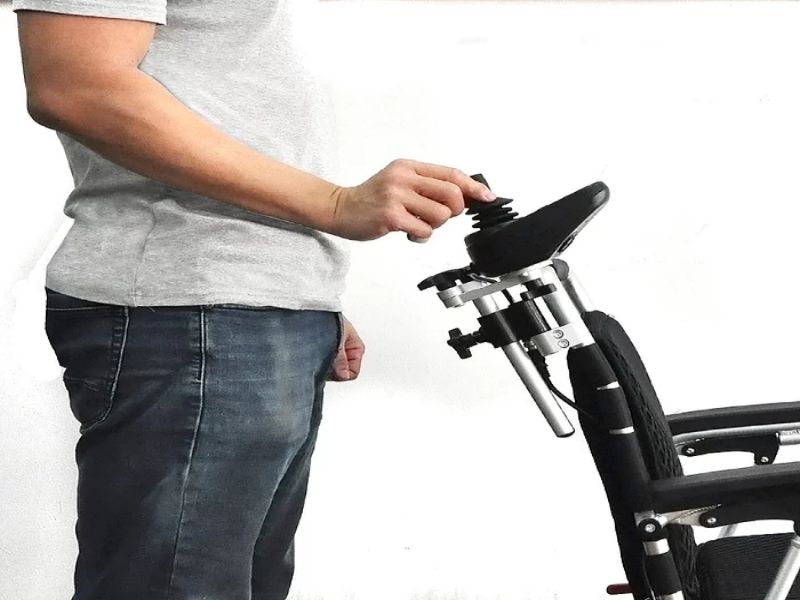
A practical inspection should focus on:
● whether the holder stays stable during normal movement
● whether the controller position still feels natural and easy to access
● whether the mount shows any play, tilt, or repeated loosening
Accessories such as turn signal lights may not support body weight, but they still play an important role in outdoor safety. If these add-ons are used regularly, their mounts, switches, lenses, and wiring should be kept clean and checked for reliability. A light that becomes dim, loose, or inconsistent can reduce visibility and make travel less predictable in shared spaces or lower-light conditions.
A reliable care routine for electric wheelchair accessories should match how these parts actually wear in daily life. Accessories that support posture, hold controls, or improve outdoor visibility usually fail gradually rather than all at once, which is why a layered schedule works best. Short daily checks help catch obvious problems, weekly care handles dirt and small shifts, and monthly inspection reveals slow wear that may affect comfort or safety before a part fully breaks down.
Care interval | Main focus | Accessories to prioritize | Typical issues to spot |
Daily | Quick usability check | Headrest, upper controller holder, leg rests | Looseness, debris, moisture, shifting position |
Weekly | Cleaning and light hardware review | High-touch accessories, removable mounts, clips, brackets | Rattling, minor wear, sticky attachment points |
Monthly | Structural wear and fit | Support accessories, straps, covers, two-piece leg rests | Bent hardware, torn padding, slipping mounts, imbalance |
Seasonal | Environmental protection and storage | Detachable accessories, electrical add-ons, padded parts | Moisture damage, dust buildup, temperature-related wear |
Daily inspection should take only a few minutes, but it needs to focus on feel as much as appearance. A headrest may still look fine while providing less support than it did a month ago, and a controller holder can seem firmly attached until it shifts during a transfer or a sharp turn. Leg rests also deserve a quick balance check because even a slight change in angle can affect comfort across an entire day of use.
This is also the best time to catch the small messes that cause bigger irritation later. Moisture, dust, crumbs, hair, and outdoor debris can collect around contact surfaces, mounting points, or moving joints. Left in place, they may interfere with smooth adjustment, make accessories feel unstable, or simply make the chair less comfortable to use. A fast pre-use check keeps these issues from becoming part of the day’s problem.
Weekly care should go beyond a visual glance and include hands-on cleaning and light function testing. High-touch areas such as padded support surfaces, holder arms, clips, and exposed brackets benefit from regular wiping because dirt buildup often hides early wear. This is also the right interval for checking whether removable accessories still slide, lock, or release the way they should. When those motions become stiff or inconsistent, the issue is often easier to correct early than after dirt and friction have had more time to build up.
Useful weekly priorities include:
● checking whether removable accessories still seat properly into their mounts
● listening for slight rattling during movement
● noticing whether padding feels flatter, softer, or less supportive than before
A monthly review should focus on performance in real use, not just whether an accessory remains attached to the chair. Support accessories need to feel correct under normal body weight and movement. A headrest that no longer supports the neck comfortably, or a two-piece leg rest setup that feels uneven from side to side, may already be affecting posture even if the hardware still holds.
Monthly inspection is also the right time to look closely at materials and attachment strength. Bent hardware, torn covers, weakened straps, slipping mounts, rust, and surface cracks often develop slowly and are easy to miss during faster checks. Comparing both leg rests side by side is especially useful because imbalance between the two can reveal wear sooner than either part considered on its own.
Seasonal care matters because accessories react differently to heat, cold, humidity, dust, and rain. Fabric and padding may hold moisture longer than expected, plastic can become more brittle in harsh conditions, metal hardware may develop corrosion, and electrical add-ons such as turn signal lights can become less reliable if moisture or dirt reaches switches and connections. After wet weather or frequent outdoor use, accessories should be dried fully and checked again before storage or reuse. Detachable parts used less often in certain seasons should be stored clean, dry, and away from extreme temperatures so they do not return to service already weakened.
Cleaning electric wheelchair accessories is not just about appearance. It helps preserve comfort materials, keeps mounted parts working smoothly, and makes early damage easier to spot. The safest approach is to match the cleaning method to the accessory type rather than treating every surface the same way. Soft-contact items need gentle moisture control, hard surfaces need non-abrasive care, and hardware or electrical add-ons require extra caution around joints, switches, and connection points.
Accessory type | Best cleaning approach | Main risk to avoid |
Padded accessories | Soft cloth, mild soap, light wiping, full air-drying | Over-wetting foam, seams, or covers |
Hard-surface accessories | Microfiber cloth and mild cleaner | Scratching finishes or weakening coatings |
Hardware and electrical add-ons | Dry or barely damp cleaning with careful detail work | Moisture entering joints, switches, or housings |
Accessories such as headrests, padded leg supports, and other soft-contact surfaces collect sweat, body oils, dust, and occasional light staining through normal use. These materials should be cleaned with a soft cloth that is only lightly dampened, not soaked, using a mild soap solution when needed. The goal is to lift surface residue without forcing moisture into padding, stitching, or inner layers that may dry slowly and trap odor.
Controlled moisture matters because padded materials can look dry on the outside while still holding dampness underneath. That hidden moisture can lead to odor, skin irritation, or gradual breakdown of foam and fabric over time. After wiping, the accessory should be left to dry fully in a well-ventilated area before use. If a removable cover is part of the accessory, it should be checked for wear during cleaning rather than simply put back in place without inspection.
Plastic and metal accessories such as controller holders, leg rest frames, trays, brackets, and mounted guards respond best to simple cleaning tools used gently. A microfiber cloth and a mild cleaner are usually enough to remove dust, hand oils, and everyday grime without damaging the surface. Harsh chemicals, rough scrubbers, or abrasive powders should be avoided because they may scratch finishes, dull protective coatings, or speed up visible wear.
Cleaning these parts also creates a useful inspection opportunity. Dust often settles into corners, edges, and mounting areas where small cracks, rust spots, or loose hardware can hide. When the surface is clean, changes in shape, texture, or stability become easier to notice, especially on accessories that are handled often or adjusted regularly.
Small areas such as clips, hinges, fastening points, switches, charging-related covers, and light housings deserve careful attention because dirt builds up where movement or connection happens. That buildup can gradually cause sticking, looseness, or reduced reliability even when the accessory still looks intact from a distance.
For these areas, a practical cleaning routine includes:
● removing dust from tight joints and fastening points
● checking whether switches and clips move smoothly after cleaning
● keeping accessories like turn signal lights dry around sensitive parts such as lenses, mounts, and wiring connections
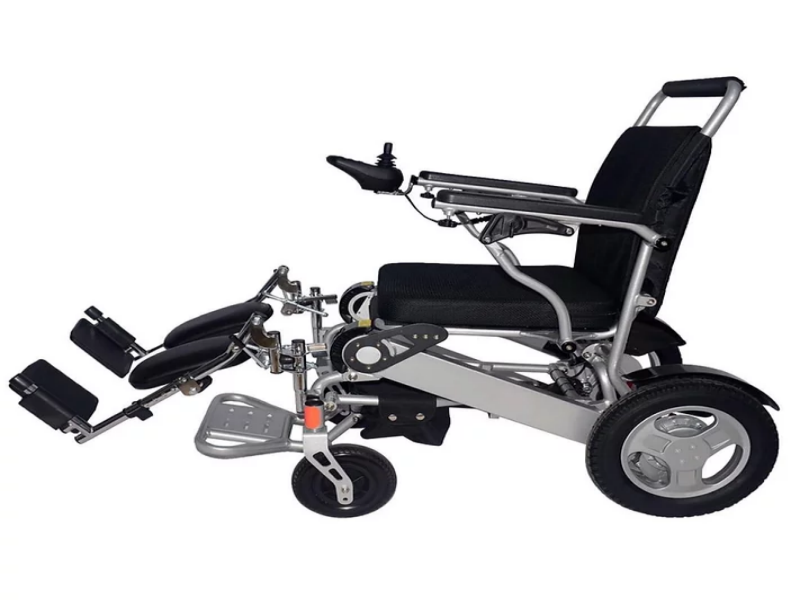
Knowing when to make a small correction and when to stop using an accessory is a key part of maintaining electric wheelchair accessories safely. Many accessory problems begin gradually, which makes them easy to ignore. A part may still look attached and usable while already causing poor posture, awkward control reach, or unstable support during transfers. The goal is to judge function, not just appearance.
Condition | Most likely action | Why it matters |
Position or angle has shifted, but the part is intact | Adjust | Fit problems often reduce comfort before any visible damage appears |
Accessory loosens repeatedly or support feels inconsistent | Repair or closer inspection | Repeated movement usually signals wear in hardware, mounts, or attachment points |
Material or structure is visibly damaged | Replace soon | Cracks, tears, rust, or bent parts can become safety risks during daily use |
Electrical add-on behaves unpredictably | Professional service | Lighting or switch-related issues can affect safe outdoor use and may involve wiring |
Some issues start as fit problems rather than true product failure. A headrest may still be in good condition but no longer support the neck properly because the angle has shifted. A controller holder can become awkward simply because its position changed slightly after repeated folding, transport, or daily transfers. Leg rests may also feel uneven after normal use, even when the padding and frame remain intact.
A practical way to recognize an adjustment issue is to ask whether the accessory still performs its original function once it is repositioned or tightened. If comfort returns, the support feels balanced again, and the part stays stable in use, replacement is usually unnecessary. Problems that disappear after a simple correction often point to fit, alignment, or fastening rather than damage.
An accessory becomes unreliable when it no longer behaves consistently from one use to the next. Common warning signs include wobbling, repeated loosening, unstable locking, reduced cushioning, uneven support, or shifting during transfers. These changes may seem minor at first, but they often signal that the accessory is moving out of the “monitor” stage and into the “act now” stage.
This is especially important for support-related accessories. Something that is still technically usable may no longer be safe if it changes posture, reduces control comfort, or makes transfers less predictable. Reliability matters as much as attachment.
Visible damage should never be dismissed as cosmetic when the accessory affects posture, control, or outdoor visibility. Cracked plastic, torn padding, rusted hardware, worn straps, bent frames, sharp edges, damaged mounts, or lights that work only intermittently all point to declining reliability. Once an accessory reaches that stage, continued use can put extra strain on the user or the mounting system.
At-home care is usually appropriate for cleaning, visual inspection, tracking gradual wear, and tightening simple accessible hardware where the manual allows it. That level of care helps users catch problems early without taking unnecessary risks. Professional help is the better choice when the same issue keeps returning, the accessory affects posture or control, or the problem involves damaged mounting points, unstable locking systems, or electrical parts such as signaling accessories. Before attempting any repair, users should check the product manual for accessory-specific limits, approved adjustments, and warnings.
Maintaining electric wheelchair accessories is essential for safe, comfortable, and reliable daily mobility. Focus on the parts that wear fastest, inspect them regularly, clean each material correctly, and respond early to changes in support or stability. Well-kept headrests, upper controller holders, leg rests, and safety add-ons help the whole setup perform better. JBH Medical adds value with practical accessory solutions and dependable support for everyday use.
A: Electric wheelchair accessories with frequent contact or movement need priority, especially headrests, leg rests, controller holders, and light mounts.
A: Check electric wheelchair accessories daily for position and debris, weekly for looseness, and monthly for wear or attachment failure.
A: Replace electric wheelchair accessories when cracks, unstable locking, torn padding, rust, or repeated loosening affect support, control, or safety.


