

Views: 0 Author: Site Editor Publish Time: 2026-04-15 Origin: Site


Electric wheelchairs do not need a full breakdown to create trouble. When electric wheelchair accessories fail, comfort, support, control, and visibility can suffer fast. In this article, you will learn how to spot common accessory problems, understand their likely causes, and choose the safest repair or replacement step.
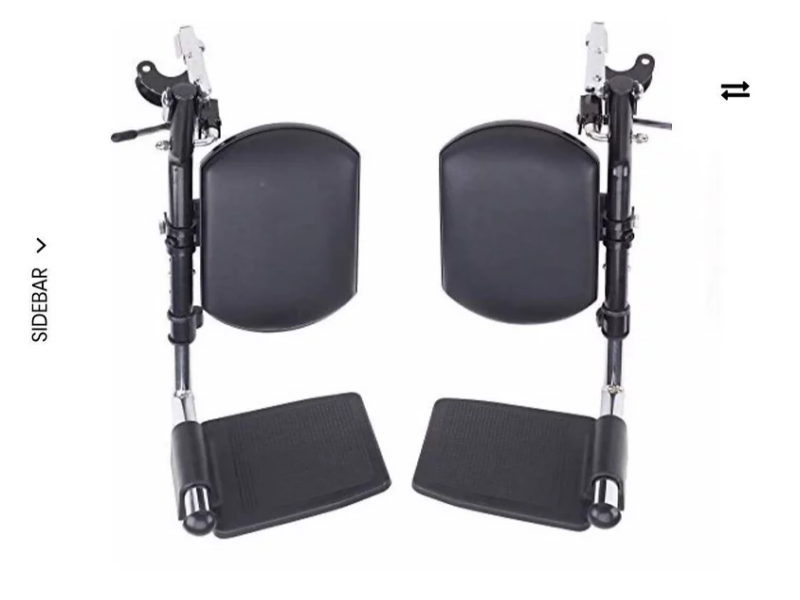
Before blaming an accessory itself, begin with the simplest failure points. Many electric wheelchair accessory issues come from loose plugs, stretched cables, weak power supply to add-ons, or mounts that have shifted out of position after regular use. A turn signal light that stops working, for example, may have a poor connection rather than a defective light unit. In the same way, a controller holder that feels unstable may only need its hardware checked, while leg rests and headrests can seem broken when the real issue is loosened adjustment points or stress around connection areas.
This first step matters because it helps separate a minor setup problem from actual part failure. It also prevents unnecessary part replacement and saves time during inspection.
Quick first checks
● Confirm the wheelchair is powered off and stable before touching any accessory.
● Look for loose plugs, visible cable strain, shifted brackets, or wobbling mounts.
● Check whether powered accessories are receiving consistent battery support.
● Inspect for obvious wear such as frayed wiring, bent hardware, or cracked attachment points.
Good troubleshooting starts with matching the symptom to the most likely component instead of guessing. That keeps users from replacing the wrong part and helps narrow the repair path faster.
Symptom | Most Likely Accessory to Check First |
Poor head and neck support | Headrest |
Difficulty reaching or stabilizing the control unit | Upper controller holder |
Discomfort, poor leg positioning, or transfer difficulty | Leg rests |
Low visibility or inconsistent signaling | Turn signal light |
Correct diagnosis matters because many problems look similar at first. A user may assume the controller is malfunctioning when the real problem is an unstable holder. In the same way, poor lower-body positioning may come from a loose leg rest rather than the seating system itself.
Even simple checks should be done carefully. Turn the wheelchair off before inspecting mounts, supports, or wiring, and avoid unnecessary contact with electrical components unless the manual clearly supports basic user inspection. Keep DIY work limited to low-risk actions such as visual checks, gentle repositioning, or tightening accessible hardware.
If an accessory affects control access, electrical signaling, or seating stability, do not treat it like a cosmetic issue. A poorly secured holder, unstable support part, or faulty light system can create safety problems long before the accessory completely stops working.
Accessory problems often begin as small annoyances rather than obvious failures. A loose support point, worn pad, weak mounting point, or strained cable may not stop the wheelchair from moving, but it can steadily reduce comfort, control, and confidence during daily use.
Accessory | Daily Function Most Affected | Why the Issue Often Gets Worse Over Time |
Headrest | Upright sitting tolerance | Repeated repositioning and padding compression reduce support quality |
Pair of leg rests | Lower-body stability and transfers | Hinges, locking points, and alignment wear down with frequent movement |
Upper controller holder | Reach and steering access | Vibration and repeated adjustment can loosen positioning hardware |
Turn signal light | Outdoor visibility and communication | Wiring exposure, switch wear, and shifting mounts make faults less consistent |
Headrest problems usually appear gradually. At first, the user may notice that the height slips slightly during use or that the padding no longer feels as supportive as before. Over time, wobbling brackets, worn cushioning, and poor alignment can make long sitting periods more tiring, especially for users who depend on steady head and neck positioning throughout the day.
What begins as minor discomfort can turn into a posture problem because the body starts compensating for weak support. That compensation often reduces comfort first, then affects confidence, especially when the user feels less stable during longer outings or extended seated tasks.
A pair of leg rests needs to work evenly to support balanced seating. When one side becomes stiffer, looser, or harder to lock than the other, the problem is not only mechanical inconvenience. Uneven leg rest positioning can change how the lower body is supported, which may affect circulation, sitting balance, and the user’s ability to prepare for transfers safely.
In daily life, these issues often show up during repeated routines rather than quick checks. A user may notice that one leg rest swings less smoothly, sits slightly lower, or feels unstable under light pressure.
Common warning signs
● One leg rest drifts out of its set position.
● The pair resists folding or adjustment.
● Hinges or locking points feel loose.
● Support becomes uneven from one side to the other.
These issues matter because transfer routines depend on predictable positioning. If the leg rests do not move or lock consistently, the user may have to compensate with awkward body movement, which increases effort and reduces seating security.
An upper controller holder can look intact while still causing real usability problems. Small shifts in angle, loose mounting hardware, or vibration at the bracket level may make the controller harder to reach or stabilize during use. This creates more than a comfort issue. If the user must stretch, reposition the arm repeatedly, or correct for movement in the holder, control becomes less consistent.
That matters most when the wheelchair is being used in tighter indoor spaces or in outdoor areas where steering needs to feel predictable. Poor controller placement can also create strain in the shoulder, wrist, or hand over time.
Turn signal light problems tend to be overlooked because they do not always stop the wheelchair from operating. However, dim output, no light at all, irregular flashing, or lights that shift out of position can become serious in outdoor or shared-space environments.
These faults are often linked to practical causes such as stressed wiring, worn switches, weak mounting points, or vibration that gradually moves the light assembly out of alignment. Unlike a purely cosmetic accessory issue, signal light failure affects how well the user communicates movement to others nearby. In parking areas, sidewalks, crossings, or other shared routes, visibility and signaling are closely tied to safe interaction with pedestrians, cyclists, and drivers.
Most accessory problems do not require immediate disassembly or advanced repair work. In many cases, the safest starting point is a small corrective action: tightening accessible hardware, cleaning around brackets and moving joints, repositioning the accessory, or checking visible external connections.
For accessories such as headrests, leg rests, controller holders, and turn signal lights, these first-response actions are often enough to restore normal function when the issue is caused by vibration, daily adjustment, or routine wear. The key is to treat them as controlled checks rather than full repairs.
Safe first-response actions
● Tighten screws, knobs, or brackets designed for routine adjustment.
● Wipe away dust, debris, or residue around joints, mounts, and support surfaces.
● Realign accessories that have shifted out of position.
● Check for loose external plugs, cable tension, or obvious wear at visible contact points.
A part that has moved out of position is not necessarily damaged, and that distinction matters. Wear usually shows up gradually through reduced padding support, repeated loosening, or less stable movement at the joint or mount. Misalignment often appears after frequent repositioning or daily use and may be corrected if the accessory still holds securely once adjusted. Actual damage is more serious because the part no longer performs safely even after correction.
Condition | What It Usually Looks Like | Best Next Step |
Wear | Padding compression, minor looseness, reduced firmness | Inspect closely and adjust if still secure |
Misalignment | Shifted angle, uneven position, awkward reach or support | Reposition and test normal function |
Actual damage | Cracks, bent metal, frayed wiring, broken locks, unstable hold | Stop adjusting and prepare for replacement or service |
This distinction helps prevent a common mistake: making the same adjustment over and over on a part that is already failing structurally. If a controller holder keeps slipping back into an unsafe position or a leg rest no longer locks consistently, repeated tightening is not a real fix.
After any small correction, test the accessory in real use rather than relying on appearance alone. An accessory can look straight, clean, or tightened and still fail under normal movement. Check whether it stays stable when touched, whether its range of motion feels smooth, whether locking points hold without shifting, and whether comfort or visibility has actually improved.
A headrest should support without slipping. Leg rests should move and hold evenly. A controller holder should remain steady during operation. A turn signal light should stay secure and function consistently instead of working only intermittently.
Some accessory problems stop being maintenance issues once they return repeatedly or begin affecting safe daily use. A headrest that will not stay in place, a pair of leg rests that no longer lock reliably, an upper controller holder that shifts during operation, or a turn signal light with damaged wiring all suggest that the problem has moved beyond a simple adjustment.
These warning signs matter because accessory failure is not always dramatic. Often, it appears as instability, inconsistency, or loss of confidence in use. A support accessory that slips slightly each day may seem manageable until posture, transfers, or control access are affected. A light that flashes only sometimes may still appear usable indoors, but that same fault becomes more serious outdoors or in shared travel space.
Accessory Problem | Why It Should Not Be Ignored |
Persistent loosening after adjustment | Suggests worn hardware, degraded mounting points, or hidden structural fatigue |
Repeated electrical faults | Points to unstable wiring, switch failure, or unreliable power delivery |
Broken locking points | Reduces secure positioning and increases the chance of unsafe movement |
Unstable controller support | Can interfere with steering access and consistent user control |
Damaged light wiring | Creates unreliable signaling and may worsen with vibration or weather exposure |
Support accessories that no longer hold position | Affects posture, comfort, transfer safety, and long-term usability |
Replacement becomes the smarter option when an accessory keeps failing after adjustment, no longer stays secure in normal use, or creates recurring problems that interrupt daily routines. This is especially true for accessories that depend on stable alignment, predictable locking, or reliable external wiring.
If a controller holder repeatedly drifts out of position, if a leg rest becomes loose again shortly after tightening, or if a turn signal light keeps cutting out despite minor fixes, continuing to work around the problem usually costs more time and trust than replacing the part.
Think of replacement as a reliability decision rather than a last resort. Users often delay replacing accessories because the part still works most of the time. In practice, that partial function can be the problem. An accessory that only works when positioned a certain way, only locks after several tries, or only lights up intermittently is already reducing daily consistency.
Replacement is usually the better path when:
● The same accessory needs repeated tightening or readjustment.
● A part stays functional only under limited conditions.
● Wear has reduced confidence in normal daily use.
● Visible damage suggests the accessory is no longer structurally sound.
● Minor fixes improve the issue briefly but do not solve it.
Professional service is the safest choice when the issue involves electrical faults, structural instability, control-related safety, or repeated failure after basic adjustment. Accessories tied to steering access, stable positioning, or visibility should not be handled casually because their failure can affect more than comfort.
A technician is the better option when an unstable holder changes controller access, when support accessories no longer remain secure under body weight, or when light-related faults may involve internal wiring rather than an external connection. If the problem keeps returning after simple checks, that is usually a sign that the root cause is deeper than routine user maintenance.
Effective troubleshooting starts by identifying the right accessory and checking simple causes first. What matters most is whether a part still works safely, comfortably, and consistently in daily use. Well-maintained electric wheelchair accessories protect support, control, and independence. JBH Medical adds value with practical accessory solutions, user-focused design, and dependable products that help reduce disruptions and improve everyday mobility.
A: Inspect electric wheelchair accessories monthly and after impact, vibration issues, or outdoor exposure.
A: Electric wheelchair accessories with moving mounts, wiring, or locking points usually wear out first.
A: Use a technician when electric wheelchair accessories affect control access, positioning safety, or lighting reliability.


